
AI resources
Integrate Checkout Pro with the Orders API and set up a predesigned experience
Agile integration
For web, Android, and iOS
Pre-built experience
With redirection to Mercado Pago
What it offers
Customization
Conversion
Payment approval
Fraud protection
Payment process
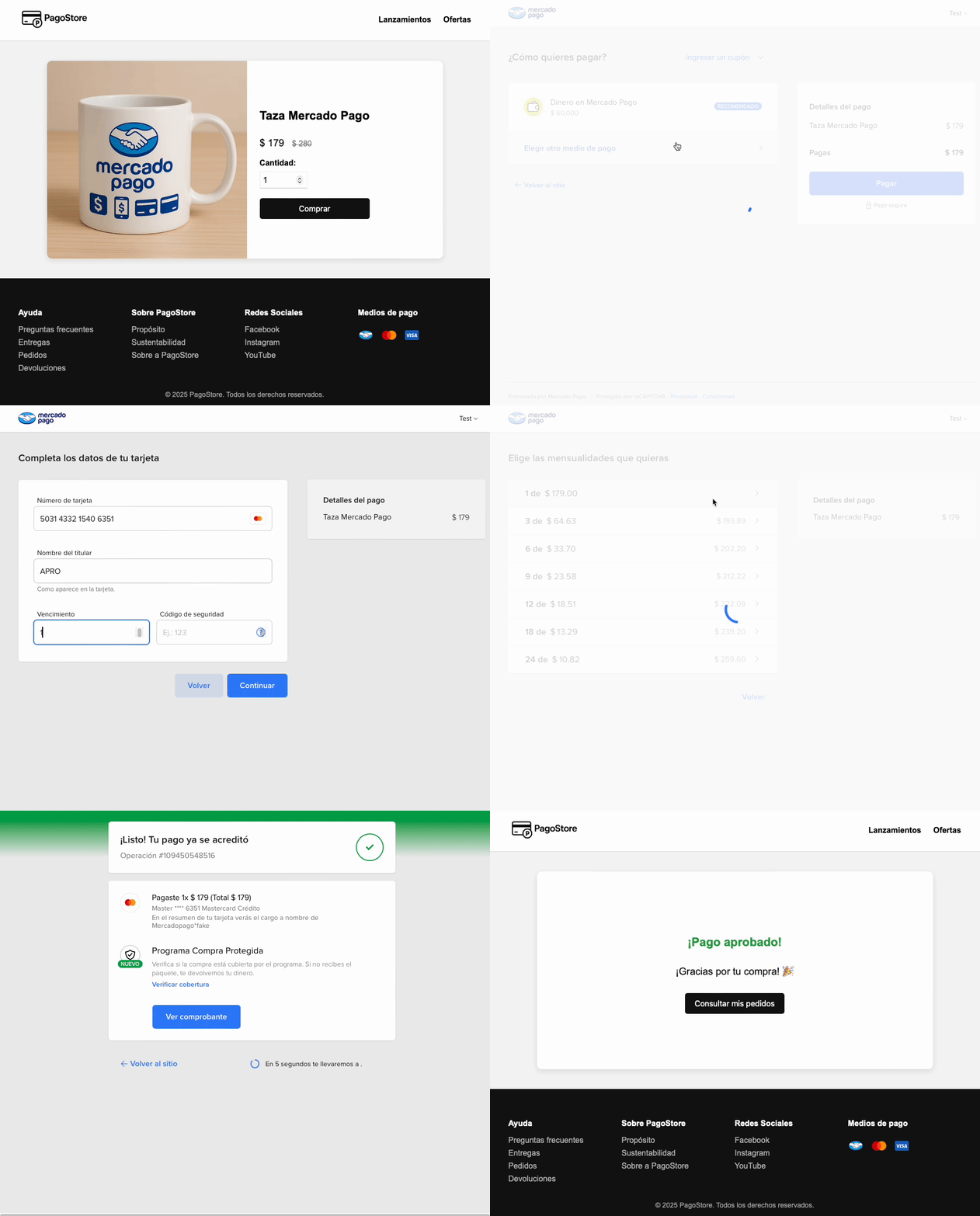
- The buyer checks out their shopping cart on your website and chooses to pay with Mercado Pago.
- Your backend creates an Order with the transaction data via `POST /v1/orders` and gets the `init_point`.
- The buyer is redirected to the `init_point`, where they decide whether to proceed with their Mercado Pago account or as a guest user and choose their payment method.
- Once the purchase is completed, they are redirected to your website or the configured destination.
What sets it apart
You are here
Checkout ProHow to integrate
Checkout APIGo to the overview
Checkout BricksGo to the overview
Integration effort
Integration effort
Integration effort
Integration effort
Customization level
Customization level
Customization level
Customization level
Design ready to set up
Design ready to set up
Design ready to set up
-
Design ready to set up
Collection experience
Collection experience
In Mercado PagoCollection experience
In your siteCollection experience
In your siteRecurring payments
Recurring payments
-
Recurring payments
Recurring payments
Payment methods
Payment methods
Credit or debit card, SPEI Transfer, OXXO, Paycash, Citibanamex, Santander, BBVA Bancomer, Mercado Pago Account and Installments without Card Payment methods
Credit or debit card, SPEI Transfer, OXXO, Paycash, Citibanamex, Santander, BBVA Bancomer, Mercado Pago Account and Installments without CardPayment methods
Credit or debit card, SPEI Transfer, OXXO, Paycash, Citibanamex, Santander, BBVA Bancomer, Mercado Pago Account and Installments without CardAvailability by country
Availability by country
AR
BR
CL
CO
MX
PE
UY
Availability by country
AR
BR
CL
CO
MX
PE
UY
Availability by country
AR
BR
CL
CO
MX
PE
UY
How to integrate
Prerequisites
- Seller accountTo integrate Checkout Pro, you need to access Mercado Pago and create a seller account.
- SSL Certificate (Secure Sockets Layer)Allows secure browsing and the protection of your data during information transfers.
    flowchart TD
            A["Access Your integrations"] --> B["Create application"]
            B --> C["Build the environment"]
            C --> D["Create an Order"]
            D -- Amount, payment methods, details, others --> F["Configure notifications"]
            F -- Webhooks and IPN --> E["Test the integration"]
            E -- Successful tests --> H["Go to production"]
            E -- Errors detected --> I["Fix configuration"]
            I --> H
            H --> J["Measure quality"]